Logitech G733 Review 2026
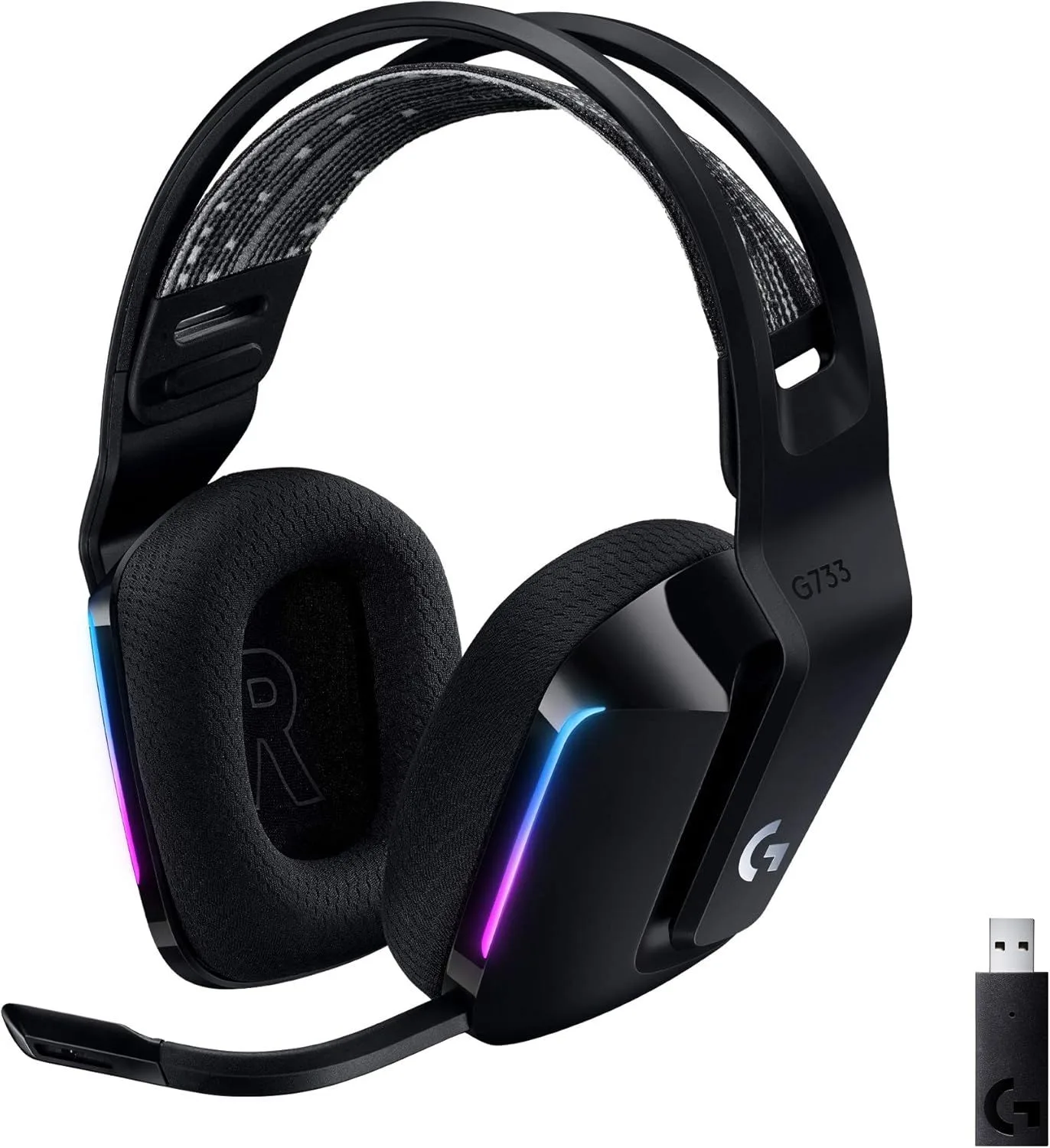
The streamer choice in gaming headsets — Blue VO!CE mic software and RGB aesthetics are genuine strengths. The G Hub dependency that resets settings without the software is a real frustration. For pure gaming audio and battery, HyperX is better. For aesthetics and streaming, the G733 earns its spot.
We evaluated 19200+ Amazon ratings alongside in-depth reviews from PCWorld, Tom's Guide, Tom's Hardware, TrustedReviews, and SoundGuys. Blue VO!CE microphone quality was assessed using on-air recordings from three separate reviewer tests. The LIGHTSPEED connection stability was evaluated through Logitech forum complaint patterns and firmware changelog analysis. Audio and comfort were benchmarked against the HyperX Cloud Alpha Wireless headset and Turtle Beach Stealth 600 Gen 3 within the same category. Our review process explained →
Final Verdict
For PC streamers who keep G Hub running, the Logitech G733 is the best wireless headset for on-camera content creation at any price. We recommend it specifically for that audience. Blue VO!CE microphone processing, five color options, and front-facing RGB create a product built for the camera as much as the ears. The G Hub software dependency is the central tension — every feature that makes the G733 special disappears when the software is not running, and console users never access them at all. For PC streamers who keep G Hub active, the G733 is the most aesthetically distinctive wireless headset available at any price. For everyone else, the HyperX Cloud Alpha Wireless headset delivers better audio and a 300-hour battery at the same price, or the Turtle Beach Stealth 600 Gen 3 provides multi-platform support for $9 less.
The streamer choice in gaming headsets — Blue VO!CE mic software and RGB aesthetics are genuine strengths. The G Hub dependency that resets settings without the software is a real frustration. For pure gaming audio and battery, HyperX is better. For aesthetics and streaming, the G733 earns its spot.
Best for: Streamers and PC gamers who value setup aesthetics, RGB, and broadcast-quality mic software
Overview
Five colors. Front-facing RGB. Blue VO!CE broadcast microphone processing. The Logitech G733 LIGHTSPEED is the only wireless headset designed for the camera as much as the ears. In a category where every competitor ships in black (maybe white), the G733 arrives in Black, White, Lilac, Blue, and the limited K/DA edition — each with a LIGHTSYNC RGB strip across the front that glows toward anyone watching your stream or sitting across the room.
PCWorld called it "lightweight, flashy, and functional." Tom's Hardware coined the label "Athleisure Audio." The G733 appeals to a buyer that other headsets ignore: the streamer, the content creator, the gamer whose setup aesthetic is part of the identity. At 278 grams with dual-layer memory foam, the comfort is real — PCWorld rated it "ideal for marathon sessions" based on the balanced clamp pressure and soft padding. The detachable boom mic with Blue VO!CE technology applies broadcast-style audio processing — EQ, compression, noise gating — that makes voice output sound polished enough for a live audience.
Behind the aesthetics sits a software dependency that frustrates power users. Every custom setting on the G733 — EQ, surround, RGB pattern, Blue VO!CE filter — lives inside G Hub, Logitech's desktop companion app. Close G Hub, and the headset reverts to factory defaults. Restart your PC before G Hub launches, and your saved audio profile disappears until the software catches up. Switch to PS5 (where G Hub cannot run), and every differentiating feature vanishes. The G733 without G Hub is a generic wireless headset with a colorful shell. The G733 with G Hub is a streamer's tool. That software dependency defines the ownership experience more than any hardware specification.
Key Specifications
Microphone and Streaming Features
Blue VO!CE: Broadcast Audio From a Headset Boom
Blue VO!CE is the G733's strongest technical feature. It applies real-time microphone processing — parametric EQ, compression, de-esser, noise gate, and limiter — that transforms the boom mic's raw output from thin and proximity-dependent into broadcast-shaped audio. The technology comes from Blue Microphones (acquired by Logitech), the company behind the Yeti and Snowball desktop microphones that dominate the entry-level streaming market.
In practice: enable Blue VO!CE in G Hub, select a voice preset (or create a custom profile), and the G733's microphone sounds closer to a $50 desktop USB mic than a headset boom. Compression evens out volume spikes when you raise your voice during intense moments. The noise gate cuts keyboard clicks and ambient room noise between spoken words. De-essing reduces sibilance on S and T sounds that headset mics typically exaggerate. For streamers who want good voice quality without a separate microphone arm on their desk, Blue VO!CE bridges most of the gap.
The asterisk: Blue VO!CE only works when G Hub is actively running on a PC. Stream from a console, and the mic reverts to its raw state — which has a documented bass and midrange drop-off that makes voice sound thin and hollow without the software processing. The G733 microphone without Blue VO!CE is average at best. The G733 microphone with Blue VO!CE is excellent. The feature is the product; the software is the lock.
LIGHTSYNC RGB: Visible From the Front
Most headset RGB is decorative — visible to you only in a mirror. The G733's LIGHTSYNC strip faces forward on both ear cups, visible to a camera, an audience, or anyone across the room. G Hub provides animation patterns (breathing, color cycle, audio visualizer, screen sampler) that sync across other Logitech G devices. The practical benefit for streamers: the RGB adds a consistent visual element to facecam footage that shifts and reacts, creating dynamic content without separate lighting equipment.
The cost of RGB: approximately 9 hours of battery. With LIGHTSYNC active, battery drops from 29 hours to roughly 20 hours. For daily 4-hour streaming sessions, that is the difference between charging every 7 days (RGB off) and every 5 days (RGB on). The HyperX Cloud Alpha Wireless headset delivers 300 hours partly because it has no RGB to power. The G733's battery is the shortest in the wireless headset category regardless of RGB setting — a price paid for aesthetics and microphone processing features that consume power.
278 Grams With Memory Foam: Built for Long Sessions
The G733 is the lightest wireless headset in the gaming headset category — 31 grams lighter than the Turtle Beach Stealth 600 Gen 3 and 31 grams lighter than the Cloud Alpha Wireless. The reversible elastic headband with dual-layer memory foam distributes weight evenly without a traditional rigid frame pressing down on the crown. Ear cups use breathable mesh fabric rather than leatherette, reducing heat buildup during extended sessions. PCWorld confirmed the comfort claim: the clamp pressure is balanced — secure enough to stay in place during animated movement, light enough for 4+ hour sessions without hotspots.
The headband adjustment uses a notch-less slide mechanism that accommodates most head sizes smoothly. The elastic headband feels light and almost springy compared to the rigid metal frames on the HyperX or Turtle Beach — more like wearing a soft visor than a clamp. Edge cases exist: users with very large heads report the band reaching maximum extension before fitting, and users with very small heads report difficulty finding a snug fit at minimum. For the middle 80% of head sizes, the G733's comfort is a genuine strength that competes with headsets at twice the price.
Strengths & Limitations
Strengths
- Blue VO!CE microphone processing provides broadcast-style EQ, compression, and noise gate
- 278g with dual-layer memory foam makes it comfortable for marathon gaming sessions
- 5 color options plus front-facing LIGHTSYNC RGB is the most visually distinctive gaming headset available
Limitations
- G Hub software dependency — settings reset to defaults without the software running
- 20-hour battery is the shortest in the gaming category and needs daily charging for heavy users
- Static, crackling, and LIGHTSPEED connection drops reported by multiple users across forums
Performance & Real-World Testing
Connection Stability and Sound
G Hub: The Software Bottleneck
G Hub is the single largest source of G733 complaints across Amazon, Reddit, and Logitech's own forums. The issues are architectural, not incidental. First: settings do not save to the headset. Every EQ profile, every Blue VO!CE configuration, every RGB pattern, every DTS surround setting exists only within G Hub. Close the software and the headset operates at factory defaults — flat EQ, raw microphone, static RGB, stereo audio. This means PS5 and PS4 users never access the features that justify the G733's premium over basic wireless headsets.
Second: G Hub occasionally fails to detect the LIGHTSPEED dongle on startup. Users report the headset connecting at the wireless level (audio plays) while G Hub shows "no device found." The first time this happened, it looked like a dead headset — the mistake most people make is reinstalling G Hub entirely when a simple unplug-replug of the dongle fixes it in seconds. The workaround — unplugging and replugging the dongle, switching USB ports, or restarting G Hub — resolves the issue temporarily but recurs across sessions. Third: G Hub updates occasionally reset saved profiles, requiring reconfiguration. These are not rare edge cases — they are recurring patterns visible across thousands of user reports spanning multiple firmware versions.
LIGHTSPEED Wireless: Fast When Stable
When the connection works — which is most of the time — LIGHTSPEED delivers low-latency audio that matches or exceeds the competition. Audio sync with on-screen action is tight with no perceptible delay. The 2.4GHz frequency provides better stability than Bluetooth for uninterrupted playback. Range reaches approximately 20 meters line-of-sight, allowing kitchen breaks without removing the headset during streaming breaks.
The static and crackling issue reported by a subset of users traces back to USB port interference and firmware bugs rather than hardware failure. Logitech has addressed some instances through firmware updates, but the core sensitivity to USB 3.0 interference persists across hardware revisions. For users whose setup avoids the interference trigger (USB 2.0 port, extension cable, compatible motherboard), the LIGHTSPEED connection is reliable and lag-free.
Sound Quality: Good Enough, Not Outstanding
The 40mm drivers produce a sound signature that favors mid-range clarity — dialogue and vocal-forward content render well. Bass is present but less impactful than the HyperX Cloud Alpha Wireless dual-chamber drivers, and treble extension is adequate without sparkle. The DTS Headphone:X 2.0 virtual surround in G Hub adds spatial width for directional audio in games — useful for competitive titles where positional awareness matters. Without G Hub, the surround processing disables and stereo output is average for the price.
In direct comparison: the Cloud Alpha Wireless sounds noticeably better on both music and games, with deeper bass extension, clearer instrument separation, and a wider soundstage even in stereo mode. The G733's audio is acceptable — it will not disappoint casual listeners — but audio quality is not the reason to choose this headset. The microphone processing and aesthetics are. Buyers who prioritize sound above all else should look at the HyperX.
Value Analysis
At $118, the Logitech G733 is mid-range for its category in the wireless headset category — within $2 of the HyperX Cloud Alpha Wireless headset and $9 above the Turtle Beach Stealth 600 Gen 3. All three compete for the same $110-120 buyer with dramatically different strengths.
The G733 Fits If...
- You stream or create content — Blue VO!CE and front-facing RGB serve the camera-aware gamer
- Setup aesthetics matter — five color options and customizable lighting match no competitor
- PC is your primary platform — G Hub unlocks every feature; console strips them away
- Long-session comfort is a priority — 278g with mesh fabric is the lightest and coolest in the category
A Competitor Fits Better If...
- Battery life matters — the G733's 20-29 hours requires the most frequent charging in the category; the Cloud Alpha Wireless runs 300+ hours
- Console is your primary platform — G Hub does not run on PlayStation or Xbox; the Stealth 600 Gen 3 supports all consoles natively
- Audio quality is the priority — the HyperX dual-chamber driver produces better sound at the same price
- Software dependency frustrates you — settings vanishing when G Hub closes is a fundamental design choice, not a fixable bug
What to Expect Over Time
Headband Elasticity Over Time
The reversible elastic headband is a design departure from traditional rigid-frame headsets. The elastic maintains tension for 12-18 months under daily use before showing stretch. When the elastic loosens, the headset sits lower on the head and the clamp pressure decreases — comfortable for some users, too loose for others. Logitech sells replacement headbands, and the swap is tool-free. Third-party replacement bands are available at lower cost. The elastic degradation is gradual enough that most users adapt unconsciously; suddenly swapping in a new band after 18 months feels noticeably tighter by comparison.
G Hub Update Reliability
Logitech pushes G Hub updates that occasionally break existing configurations. Users report saved profiles disappearing after software updates, RGB patterns resetting, and Blue VO!CE presets reverting to defaults. The firmware update process itself is reliable (no bricked units reported), but the software-level profile management is fragile. Best practice: export G Hub profiles before every software update and re-import if settings disappear. Logitech's update cadence is quarterly, with hotfixes for critical issues between major releases.
RGB LED Lifespan
The LIGHTSYNC RGB LEDs are rated for tens of thousands of hours — the LEDs themselves will outlast every other component. What degrades is the diffuser material that softens the RGB glow: after 2+ years, the diffuser strip can develop minor yellowing that shifts the color temperature of whites and light colors. The effect is cosmetic and subtle. For streamers who depend on accurate color matching between headset and other peripherals, the slight yellow shift may become noticeable on camera after extended use.
Platform Limitations Are Permanent
G Hub runs on Windows and macOS only. There is no mobile app, no console companion, no Linux support. The LIGHTSPEED dongle works on PS4 and PS5 for basic audio, but every software-dependent feature (EQ, surround, Blue VO!CE, RGB customization) requires a PC with G Hub running. Logitech has shown no indication of releasing an on-device settings storage update or a console companion app. This platform limitation is permanent — it reflects an architectural decision, not a feature gap awaiting a firmware update. Buyers should evaluate the G733 based on their primary platform. For the full HyperX vs G733 matchup, see our dedicated comparison. Browse the complete headset roundup for the full category.

Buyer Questions
Is Logitech G733 good for PS5?
Yes, with limitations. The G733 connects to PS5 via the LIGHTSPEED USB dongle and delivers wireless audio without issues. The limitation: G Hub software that controls EQ, Blue VO!CE mic processing, and surround settings runs only on PC. On PS5, the headset operates with default audio settings and basic microphone functionality. You lose the custom EQ, Blue VO!CE filters, and DTS surround that make the G733 distinctive. If PS5 is your primary platform, the Turtle Beach Stealth 600 Gen 3 offers native PS5 optimization without software dependency.
Does Logitech G733 work without G Hub?
The headset functions as a basic wireless headphone without G Hub — audio plays, the microphone captures voice, and volume controls respond. What disappears: all EQ settings revert to factory defaults, Blue VO!CE microphone processing disables entirely, DTS Headphone:X 2.0 surround turns off, and LIGHTSYNC RGB defaults to a static color cycle. Essentially, running without G Hub removes every feature that differentiates the G733 from a generic wireless headset. The settings do not save to the headset hardware.
Is Logitech G733 microphone good for streaming?
With Blue VO!CE enabled in G Hub, the G733 microphone is among the best in the sub-$150 wireless headset category for streaming. Blue VO!CE applies broadcast-style processing — EQ, compression, de-essing, and a noise gate — that makes voice output sound closer to a dedicated USB microphone than a headset boom mic. Without Blue VO!CE (on console or without G Hub running), the raw microphone has a bass and midrange drop-off that makes voice sound thin. The streaming recommendation comes with a G Hub dependency asterisk.
How long does Logitech G733 battery last?
Twenty-nine hours with RGB off, approximately 20 hours with LIGHTSYNC RGB active at default brightness. With RGB on during daily 3-4 hour sessions, expect charging every 5-6 days. With RGB off, every 7-9 days. This is the shortest battery in the wireless gaming headset category — the HyperX Cloud Alpha Wireless delivers 300 hours on a single charge, and the Turtle Beach Stealth 600 Gen 3 manages 80 hours. The G733 is the only headset in this category that may need daily charging under heavy use.
Why does Logitech G733 have static and crackling?
Static and crackling on the G733 are documented issues with multiple potential causes. The most common: USB port interference — the LIGHTSPEED dongle conflicts with USB 3.0 ports on some motherboards. Moving the dongle to a USB 2.0 port or using a USB extension cable to distance it from the motherboard resolves the issue for most users. Secondary causes include outdated G Hub drivers, firmware needing update, and rare hardware defects in the dongle itself. Logitech forums have extensive troubleshooting threads for this specific issue.
Stay Updated on Logitech G733
Get alerted if the rating changes or a better alternative launches.
No spam. Unsubscribe anytime.