Gaming Headset Buying Guide: What Matters for PC, PS5, and Xbox
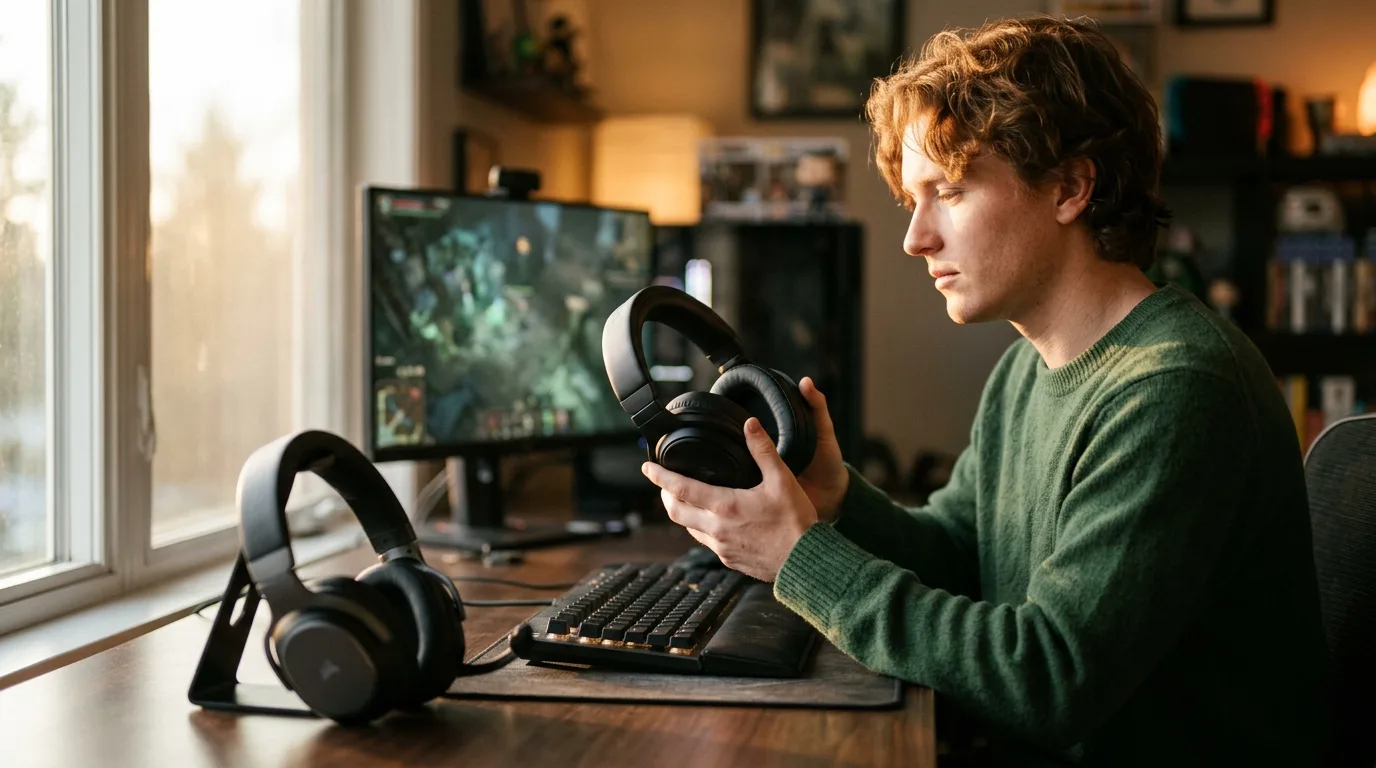
Wireless gaming headsets balance four competing demands: low audio latency, clear microphone pickup, reliable platform compatibility, and comfort during marathon sessions. This guide breaks down the technical factors that separate a headset worth keeping from one that collects dust after a week.
We analyzed owner feedback from over 30,000 Amazon ratings across three leading wireless headsets for gaming, cross-referenced with editorial measurements from RTINGS, Tom's Guide, and SoundGuys. The research covers 2.4GHz versus Bluetooth latency testing, microphone comparison recordings, multi-platform compatibility matrices, and long-session comfort reports.
And the platform differences are real.
Competitive shooters on PC, narrative adventures on PlayStation, and party games on Switch each demand different hardware — and buying the wrong headset for your platform wastes money. Start with how you play, and the right pick follows.
Wireless Gaming Headset Overview
Why Wireless Latency Is the First Spec to Check
Audio latency determines whether what you hear matches what you see on screen. Not a subtle issue. A wired headset delivers sub-5ms latency because the analog signal travels at near-light speed through copper. Wireless adds processing time for encoding, transmitting, and decoding the audio stream.
And the protocol matters. Two wireless protocols dominate the headset market, and they are not interchangeable for gaming. Bluetooth was designed for phone calls and music streaming — its codecs prioritize battery efficiency and audio fidelity over speed. SBC, the default Bluetooth codec, introduces 150-200ms of delay. AAC runs around 100-130ms. Even aptX Low Latency, the fastest Bluetooth codec available, sits at 30-40ms. For a casual single-player game, 100ms is tolerable. For a competitive first-person shooter where a single frame of advantage wins gunfights, it is not.
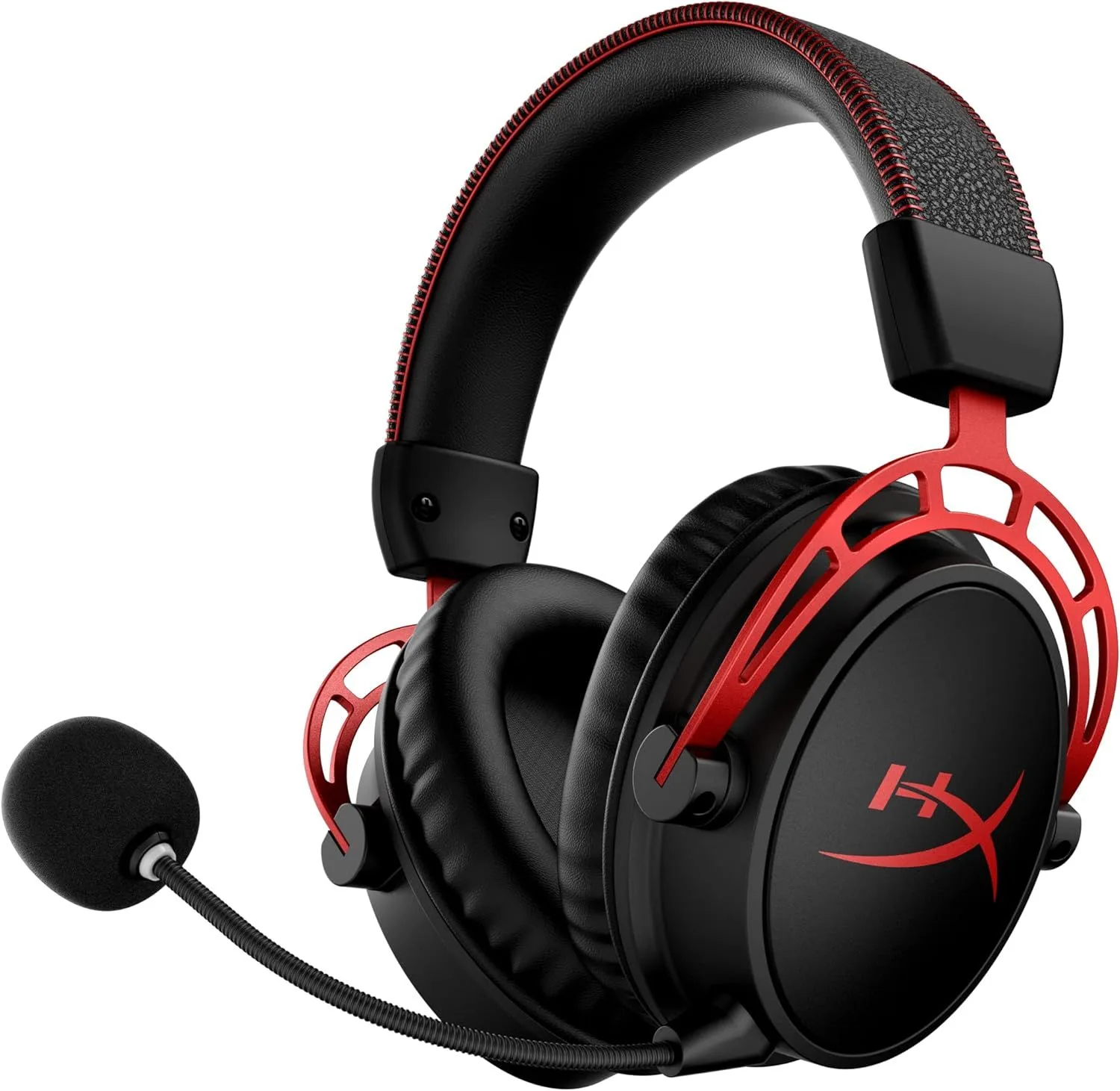
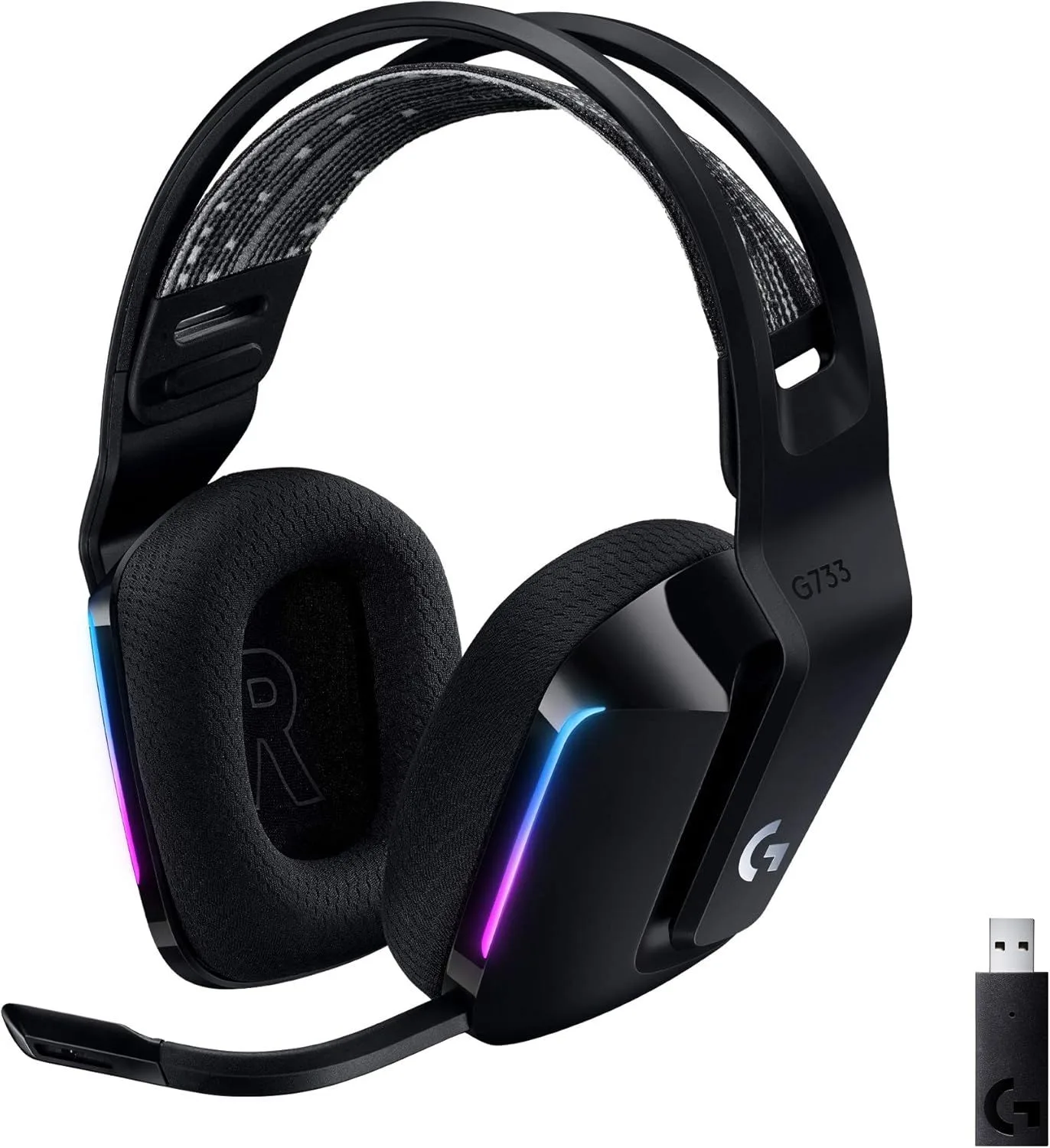
The 2.4GHz proprietary wireless protocol solves the latency problem by using a dedicated USB dongle that communicates directly with the headset on its own frequency band. The HyperX Cloud Alpha Wireless delivers under 20ms latency through its dongle — within the threshold where audio and video appear perfectly synchronized. The Logitech G733 uses Logitech's LIGHTSPEED protocol at similar latency. The Turtle Beach Stealth 600 runs both 2.4GHz and Bluetooth simultaneously, letting you take phone calls over Bluetooth while game audio streams through the low-latency dongle.
The practical test is simple. Fire a gun in any shooter with a Bluetooth headset — you will see the muzzle flash before you hear the shot. Do the same test with a 2.4GHz dongle headset — the flash and sound arrive together. This gap matters less in turn-based or narrative games, which is why some multi-platform headsets include both connection types. Use 2.4GHz for anything competitive, and Bluetooth for everything else.
Microphone Quality: What Your Teammates Actually Hear
A gaming headset microphone needs to accomplish three things: capture your voice clearly at normal speaking volume, reject background noise from keyboards and fans, and avoid clipping when you raise your voice during intense moments. Most headset mics accomplish the first two. The third separates adequate mics from good ones.
Detachable boom mics extend a flexible arm from the ear cup, positioning the capsule 2-3 inches from your mouth. This proximity means the mic captures your voice at a much higher volume relative to room noise, producing a cleaner signal-to-noise ratio without heavy software processing.
The HyperX Cloud Alpha Wireless and Logitech G733 both use detachable boom designs, but the execution differs substantially. The Logitech G733 pairs its boom mic with Blue VO!CE software — a suite of EQ, compression, noise gate, and de-essing filters ported from Blue Microphones' broadcast tools. The result sounds processed but clear, which works well for streaming and Discord. The HyperX Cloud Alpha Wireless's boom mic captures a more natural tone but at lower gain — Discord and in-game chat often require gain to be maxed, and quiet speakers may not be heard over louder teammates.
Flip-to-mute is a mechanical muting mechanism where rotating the boom mic upward activates a mute switch. The Turtle Beach Stealth 600 uses this design, and it solves a real problem: physical mute feedback. Pressing a button leaves ambiguity about mute state — you glance at an LED or check software. Flipping the mic up provides instant tactile and visual confirmation. For players who toggle mute frequently during matches, flip-to-mute saves the embarrassment of talking to a muted mic or broadcasting a private conversation.
Built-in microphones (no boom arm) sit flush with the ear cup housing. These are smaller, use MEMS capsules instead of condenser elements, and pick up more ambient noise because they sit further from your mouth. No gaming headset with a built-in mic matches the voice clarity of a boom mic at the same price point. If your primary use case includes voice chat, a boom mic is the minimum standard.
Surround Sound for Gaming: Virtual Processing vs Stereo
Every gaming headset is physically stereo — two drivers, one per ear. Virtual surround sound (marketed as 7.1, Dolby Atmos for Headphones, Windows Sonic, or DTS Headphone:X) is software processing that manipulates the stereo signal to simulate directional audio from multiple virtual speaker positions around your head.
The processing uses head-related transfer functions — mathematical models of how sound changes as it wraps around a human head from different angles. When a game engine sends a sound from a specific 3D position, the surround processor applies the appropriate HRTF filters before reaching your ears. The result can be convincing: footsteps behind you sound different from footsteps beside you, explosions have spatial width, and ambient environments feel three-dimensional.
Where virtual surround falls apart is precision. Competitive multiplayer demands pinpoint directional accuracy — you need to know whether the footsteps are at your 4 o'clock or your 5 o'clock. Raw stereo delivers this with no processing artifacts because the game engine's built-in audio system already handles spatialization. Adding a second layer of virtual surround processing on top can smear the directional cues, making left-right placement feel vague instead of precise. Many professional esports players disable surround processing entirely for this reason.
The Logitech G733 includes DTS Headphone:X 2.0 via Logitech G Hub software. For single-player games — open-world RPGs, cinematic action titles, horror games where ambient immersion matters — the virtual surround adds a sense of space that enhances the experience. For competitive titles where a split-second reaction to footstep direction wins rounds, switch to stereo. Most headset companion apps let you toggle surround on and off without restarting the game, so experiment with both modes in your primary game before committing.
Tempest 3D AudioTech on PlayStation 5 bypasses headset-level surround entirely. The console applies its own HRTF processing before the audio reaches the headset, so the headset receives a pre-spatialized stereo signal. Enabling headset-level virtual surround on top of Tempest creates a double-processing artifact that sounds hollow and disorienting. On PS5, keep your headset in stereo mode and let the console handle spatial audio natively. The HyperX Cloud Alpha Wireless and Turtle Beach Stealth 600 both pair well with Tempest because they pass through the console's spatial audio without interfering.
Platform Compatibility: The Spec Most Buyers Check Last
Platform compatibility is the single most returned-headset reason in the wireless category, and it stems from a fragmented ecosystem where PC, PlayStation, Xbox, and Nintendo Switch each handle wireless audio differently.
PC accepts virtually any wireless headset via USB dongle. Plug the 2.4GHz dongle into a USB-A port, and Windows recognizes it as an audio device. Companion software (G Hub for Logitech, NGenuity for HyperX, Swarm for Turtle Beach) runs on PC to enable EQ customization, surround sound toggles, and microphone adjustments. PC is the universal platform — if a headset works anywhere, it works on PC.
PlayStation 5 and PS4 also accept USB audio dongles natively. The HyperX Cloud Alpha Wireless and Logitech G733 both work on PlayStation without adapters. However, companion software does not run on consoles — any EQ profiles or surround settings configured through PC software are either stored on the headset itself (headset-side processing) or unavailable on console. The HyperX Cloud Alpha Wireless's DTX Ultra profiles are stored on the headset after configuration in NGenuity, so they persist on PlayStation. The Logitech G733's DTS processing requires G Hub running on PC and does not transfer.
Xbox is the compatibility bottleneck. Microsoft requires either the proprietary Xbox Wireless protocol (the same radio used by Xbox controllers) or Bluetooth for wireless headset connection. Generic USB audio dongles do not work on Xbox. The Turtle Beach Stealth 600 sells platform-specific SKUs — the Xbox version includes Xbox Wireless protocol, while the PlayStation version uses a standard 2.4GHz dongle. Buying the wrong SKU for your console is a common and frustrating mistake. The HyperX Cloud Alpha Wireless and Logitech G733 do not support Xbox wirelessly without a third-party adapter like the Bluetooth Audio Adapter from Microsoft.
Nintendo Switch supports USB audio in docked mode only. The dongle plugs into the Switch dock's USB port, and audio routes through it. In handheld mode, the Switch supports Bluetooth audio (added in firmware 13.0.0) but with higher latency that makes action games feel laggy. The Turtle Beach Stealth 600's simultaneous Bluetooth works in handheld mode as a fallback, though latency will be noticeable in timing-sensitive games.
Comfort Engineering for Late-Night Sessions
A three-hour ranked session or a six-hour weekend co-op marathon demands comfort that most headsets cannot sustain. Weight, clamping force, ear cup depth, and headband padding all interact differently across head shapes, and the failure point usually emerges between hour two and hour three.
Weight is the simplest comfort variable and the easiest to compare on a spec sheet. The Logitech G733 at 278g is the lightest wireless headset for gaming we cover — light enough that some users forget they are wearing it during long sessions. The HyperX Cloud Alpha Wireless at 309g and Turtle Beach Stealth 600 at 300g are heavier but still within the comfortable range for most head sizes. Above 350g, neck fatigue becomes noticeable after two hours. The Sony WH-1000XM6, which some gamers repurpose for gaming, weighs 252g but lacks the gaming-specific features (low-latency wireless, boom mic) that make the weight trade-off worthwhile.
Clamping force holds the headset on your head during head movement — leaning, looking up at a second monitor, or reacting physically during intense gameplay. Too little clamp and the headset slides when you move. Too much and temple pressure builds into a headache. The Logitech G733's elastic suspension headband distributes force across the top of the head rather than concentrating it at two side pressure points, which is why it tops comfort rankings despite not having the deepest ear cushions.
Ear cup depth determines whether your outer ear (pinna) contacts the inner wall or driver baffle. Contact creates pressure soreness that compounds over time. The HyperX Cloud Alpha Wireless uses thick memory foam cushions with a deep interior cavity that clears most ear sizes. The Turtle Beach Stealth 600 has shallower cups — owners with larger ears report pinna contact after 90 minutes that requires repositioning.
Headband padding is the Turtle Beach Stealth 600's documented weak point. Multiple owner reviews flag thin headband foam that creates a pressure hotspot at the crown of the head after two hours. This is the most-cited comfort complaint in the 5,500+ Amazon reviews for that model. Aftermarket headband pads from Brainwavz and Dekoni solve the issue for under twenty dollars, but it requires additional purchase.
EQ Software and Companion Apps
Every wireless headset for gaming ships with a default sound profile — a frequency response curve chosen by the manufacturer. Some people love the default. Many do not. Companion software lets you reshape the frequency response, adjust microphone settings, configure surround processing, and update firmware. The quality of this software varies as much as the hardware.
HyperX NGenuity provides a full parametric EQ with DTX Ultra spatial audio presets. Settings save to the headset's onboard memory, so your EQ profile persists when you unplug the dongle and move to a console. This headset-side storage is a critical advantage for multi-platform gamers — configure once on PC, use everywhere. The app itself is clean and stable. Not all manufacturers manage this.
Logitech G Hub is the most feature-rich companion app in the gaming headset space. It controls EQ, surround sound profiles, RGB lighting patterns, Blue VO!CE microphone processing, and per-application audio routing.
But it frustrates users. It is also the most complained-about. G Hub requires the software to be running for any customization to apply — close the app and the Logitech G733 reverts to factory defaults. Users on forums report settings not saving, the app failing to detect the headset after updates, and random profile resets. The features inside G Hub are excellent. The reliability of G Hub itself is the weak link.
Turtle Beach Swarm II covers EQ adjustment, superhuman hearing mode (enhanced footstep audio), Bluetooth pairing management, and firmware updates. The interface is simpler than G Hub — fewer features but fewer stability complaints. The Turtle Beach Stealth 600 stores some settings on the headset, but the most advanced audio modes require the app running on a connected device.
Battery Life: The Difference Between Convenience and Frustration
A dead headset mid-match is painful. It forces you to either play in silence or fumble with a charging cable while staying in-game. Battery life is not a vanity spec — it is a reliability spec that determines how often this interruption happens.
The HyperX Cloud Alpha Wireless at 300 hours (tested at 327 hours by RTINGS) sits in a category of its own. At 4 hours of daily gaming, that translates to charging roughly once every 11 weeks. You will forget this headset needs charging because it almost never does. The internal battery uses a low-power DAC and Class-D amplifier design that sips current. No other wireless gaming headset comes within 200 hours of this figure.
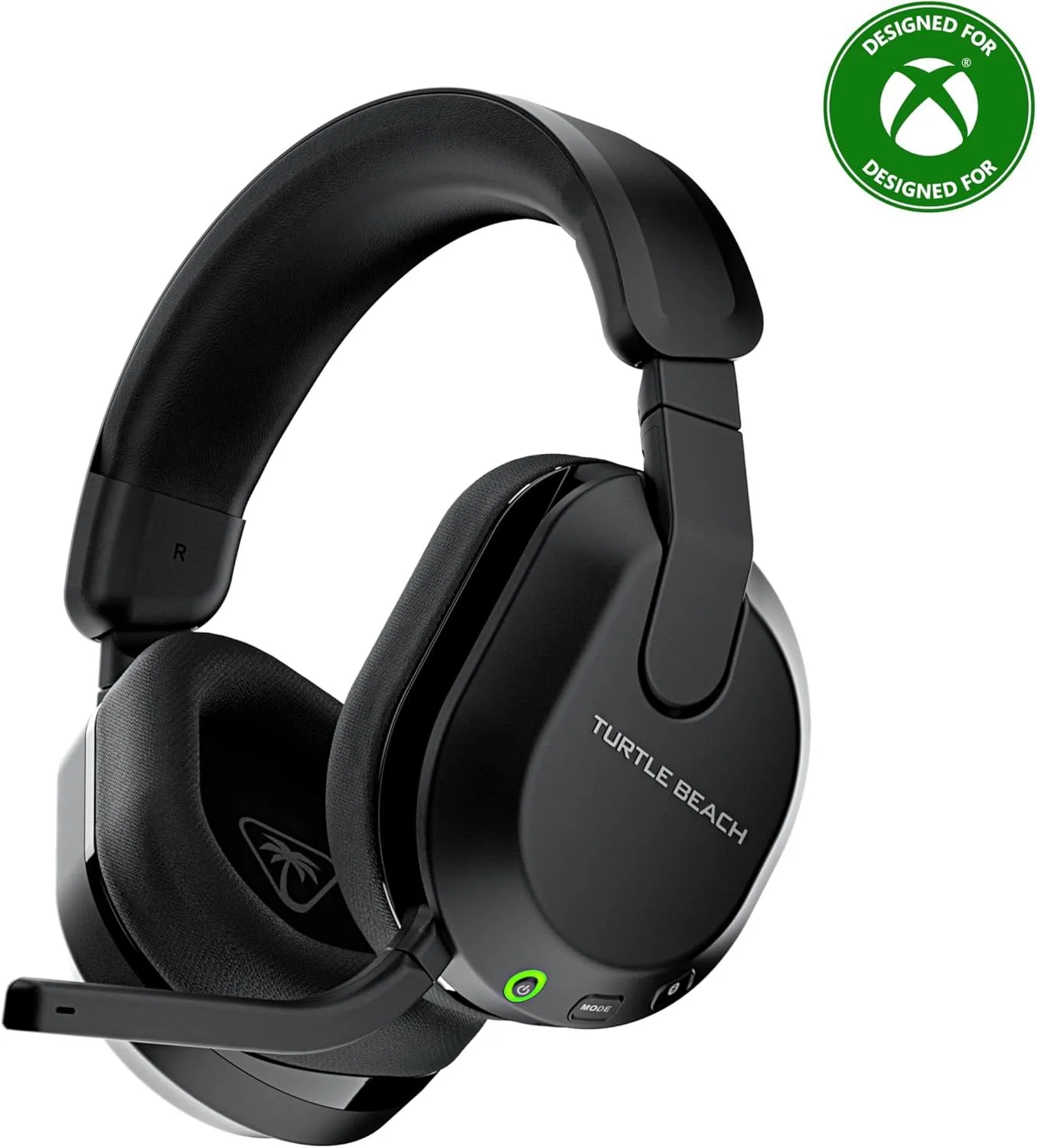
The Turtle Beach Stealth 600 at 80 hours is the second-longest in the wireless gaming headset segment. At the same 4-hour daily rate, that is three weeks between charges. The dual wireless system (running 2.4GHz and Bluetooth simultaneously) draws more power than a single-connection headset, yet it still outlasts most competitors by a wide margin. The 80-hour figure holds up in real-world use based on owner reports.
The Logitech G733 at 20 hours (with RGB lighting active) is the shortest battery life in this group. Turn off the LIGHTSYNC RGB and runtime extends to 29 hours, but that removes one of the headset's primary selling points. At 20 hours, heavy users who game 4-5 hours daily need to charge every 4-5 days. The headset supports USB-C charging while playing, so a dead battery does not force silence — but it does force a tethered session that defeats the purpose of wireless.
Quick-charge support varies across models. The HyperX Cloud Alpha Wireless does not advertise a quick-charge spec because it rarely needs emergency charging. The Turtle Beach Stealth 600 adds meaningful playtime from a short charge. The Logitech G733 does not support quick-charge, making its shorter battery life feel even more constraining for daily gamers. If you are choosing between two headsets and everything else is close, pick the one with longer battery — the convenience compounds over months of ownership.
Common Mistakes When Buying a Wireless Headset for Gaming
Buying a Bluetooth headset for competitive multiplayer. This is the most expensive mistake in the category because it is not obvious until you experience the latency in a live match. Bluetooth audio was engineered for music playback and phone calls, not frame-precise game audio. If you play anything where reaction time matters — shooters, fighting games, rhythm games — you need a 2.4GHz dongle connection. Save Bluetooth for casual mobile games and media consumption.
Assuming all wireless headsets work on Xbox. Xbox's closed wireless ecosystem rejects generic USB audio dongles. Buyers who purchase a 2.4GHz headset designed for PC and PlayStation discover on unboxing that it does not pair with their Xbox Series X. Always verify Xbox-specific wireless support. The Turtle Beach Stealth 600 Xbox SKU works. The HyperX Cloud Alpha Wireless and Logitech G733 do not, without a separate Bluetooth adapter.
Ignoring microphone quality until after purchase. Headset microphone quality is invisible on a spec sheet — sensitivity and frequency response numbers do not predict how you will sound in a Discord call. Search YouTube for "[model name] microphone test" before buying. Listen for background noise rejection, voice clarity at normal volume, and distortion when the speaker raises their voice. The HyperX Cloud Alpha Wireless's weak mic is the most common complaint in its Amazon reviews despite excellent audio and battery performance.
Prioritizing RGB and aesthetics over audio fundamentals. The Logitech G733's LIGHTSYNC RGB is the most visible feature in product photos, and it draws buyers who care about desk aesthetics. RGB drains 9 hours of battery life (29 hours without versus 20 hours with) and adds zero audio performance. If your priority is gaming audio quality and battery longevity, RGB is a feature tax you pay in runtime. If your priority is streaming aesthetics where viewers see your setup, RGB adds real value. Know which buyer you are before deciding.
Skipping the companion software setup. Every headset we cover sounds better after EQ adjustment than it does out of the box. Default tuning is a compromise aimed at the widest audience. Spending 15 minutes in NGenuity, G Hub, or Swarm — boosting treble for footstep clarity, cutting muddy low-mids, adjusting the noise gate on your mic — transforms the experience. Owners who skip software setup and judge the headset on defaults are hearing 70% of what the hardware can deliver.
How Wireless Headsets for Gaming Compare to Music Headphones
The Sony WH-1000XM6 and other premium noise-cancelling headphones get repurposed for gaming frequently, especially by buyers who want one headset for everything. This works for casual, single-player gaming — the sound quality of a premium music headphone exceeds most dedicated gaming models. But three structural gaps make music headphones poor choices for competitive or social gaming.
Latency. The Sony WH-1000XM6 connects via Bluetooth with approximately 100ms of latency using AAC. For music, 100ms is imperceptible because there is no visual reference to sync against. For gaming, 100ms desynchronizes audio from on-screen action. You can connect via the included 3.5mm cable for zero latency, but that sacrifices wireless freedom and disables the microphone on most music headphones.
Microphone. Premium music headphones use internal MEMS mics designed for phone calls, not continuous voice chat. The voice quality is adequate for a quick call but thin and distant compared to a boom mic positioned 2 inches from your mouth. No music headphone matches even a mid-range gaming headset boom mic for Discord and in-game communication clarity.
Platform integration. Music headphones lack companion software for gaming-specific features: surround sound processing, per-game EQ profiles, superhuman hearing modes, and sidetone (hearing your own voice in the headset to prevent shouting). These features exist because gaming has specific audio requirements that music playback does not. If you own a premium music headphone and want to game, use it for single-player titles where latency and mic quality are secondary. For multiplayer, use a dedicated wireless headset with a 2.4GHz dongle.
What to Expect at Each Price Tier
Under seventy dollars: Wired headsets dominate this range. Wireless options exist but sacrifice battery life, microphone quality, or build durability. If you need wireless under seventy dollars, expect compromises in at least two of the three core areas (latency, mic, battery). A wired headset at this price often outperforms a wireless one at the same cost.
Seventy to one hundred and thirty dollars: The competitive sweet spot. The HyperX Cloud Alpha Wireless, Logitech G733, and Turtle Beach Stealth 600 all sit in this range and represent the best value per feature-dollar in wireless gaming audio.
This is where most gamers should shop.
2.4GHz low-latency connections become standard, battery life ranges from 20 to 300+ hours, and microphone quality is adequate for squad communication. Each headset in this tier trades one strength for another — battery versus mic versus platform breadth — rather than compromising on everything.
One hundred thirty to two hundred and fifty dollars: Premium wireless headsets from SteelSeries, Astro, and Corsair add higher-resolution drivers, premium build materials (aluminum frames, magnetic ear cushions), and advanced spatial audio processing. The audio quality gap between this tier and the one below is real but narrower than the jump from budget to mid-range. If you already own a mid-range headset and the audio quality satisfies you, the premium tier adds refinement rather than transformation.
Above two hundred and fifty dollars: Flagship gaming audio — the Audeze Maxwell, SteelSeries Arctis Nova Pro Wireless, and similar high-end models. Planar magnetic drivers, simultaneous 2.4GHz and Bluetooth, ANC for mixed use, and broadcast-quality boom mics. This tier is for buyers who game daily, value audio fidelity as a core part of the experience, and want a headset that doubles as a music headphone. For most gamers, the seventy-to-one-hundred-thirty-dollar tier covers the essentials without overspending.
Where to Start Based on How You Play
PC and PlayStation gamers who hate charging: The HyperX Cloud Alpha Wireless is our top pick for raw wireless gaming performance. The 300-hour battery means you will forget this headset needs power. Audio quality through the dual-chamber drivers is the best in the price range, and the 2.4GHz dongle delivers sub-20ms latency. Budget for a separate desktop mic if you stream or need crystal-clear voice chat — the built-in boom mic is the one weakness. Read our full battery and audio breakdown for detailed measurements.
Streamers and aesthetic-focused gamers: The Logitech G733 pairs Blue VO!CE broadcast mic processing with RGB lighting and the lightest weight in the category at 278g. The G Hub software frustrations are real, but the mic quality for streaming and the visual appeal for on-camera setups are hard to match at this price. Our detailed G733 review covers the G Hub reliability issues and workarounds.
Multi-console households: The Turtle Beach Stealth 600 is the only headset in this tier that works across Xbox, PlayStation, Switch, and PC without adapters. Dual wireless (2.4GHz plus Bluetooth simultaneously) means you can take phone calls during gameplay without disconnecting game audio. The 80-hour battery and flip-to-mute mic round out a practical feature set. Budget twenty dollars for an aftermarket headband pad to fix the one comfort weak point. See our multi-platform testing details for per-console setup instructions.
Buyers choosing between the top two PC headsets: The HyperX Cloud Alpha Wireless wins on battery, audio quality, and pure gaming performance. The Logitech G733 wins on microphone software, weight, and streaming features. Our direct comparison breaks down every category with side-by-side measurements. For competitive multiplayer, pick HyperX. For streaming and content creation, pick Logitech. If platform versatility matters most, skip both and grab the Turtle Beach Stealth 600.
Frequently Asked Questions
Why is Bluetooth bad for competitive gaming?
Bluetooth audio introduces 100-300ms of latency depending on the codec — SBC averages 170ms, AAC around 120ms, and even aptX Low Latency sits at 40ms. For reference, a single frame at 60fps takes 16.7ms. At 170ms of audio delay, gunshots, footsteps, and ability cues arrive noticeably after their visual trigger, which breaks the audiovisual sync competitive players depend on. A 2.4GHz wireless dongle like the one in the HyperX Cloud Alpha Wireless delivers under 20ms latency — close enough to wired performance that most players cannot perceive the difference. Use Bluetooth for music and phone calls. Use 2.4GHz or wired for any game where reaction time matters.
Do I need virtual surround sound for gaming?
Virtual 7.1 surround processing takes a stereo signal and applies head-related transfer functions (HRTFs) to simulate directional audio from multiple speaker positions. It helps in single-player games with cinematic soundscapes — explosions feel wider, ambient sounds wrap around you. For competitive multiplayer, the results are mixed. Some players find virtual surround muddies the precise left-right positioning that stereo delivers cleanly, making footstep direction harder to pinpoint. The Logitech G733 includes DTS Headphone:X 2.0 through its companion software. Try it in both modes and decide based on your ears and game genre — many pros play on stereo with the processing off.
Can I use the same wireless headset on PC and console?
It depends on the connection method and console manufacturer. Most 2.4GHz USB dongles work on PC and PlayStation because both platforms accept standard USB audio devices. Xbox requires either a headset licensed through the Xbox Wireless protocol or a Bluetooth connection — it does not accept generic USB audio dongles. The Turtle Beach Stealth 600 solves this with platform-specific SKUs that include the correct wireless protocol for each console, plus simultaneous Bluetooth for phone audio. The HyperX Cloud Alpha Wireless works on PC and PlayStation out of the box but has no Xbox support without a third-party adapter. Always check platform compatibility before buying.
How important is microphone quality in a gaming headset?
Microphone quality matters for multiplayer communication, streaming, and Discord calls — but the bar is lower than most marketing implies. Teammates need to hear your callouts clearly, not studio-quality voice. A headset mic that reduces background noise, captures speech at a consistent volume, and avoids clipping during loud calls covers 90% of use cases. The Logitech G733 with Blue VO!CE processing handles all three well. Dedicated streamers will eventually outgrow any headset mic, but for squad communication, a decent built-in or detachable boom mic works. The HyperX Cloud Alpha Wireless is the one weak point — its mic requires maximum gain to be audible, so budget for a separate desktop mic if voice quality matters to you.
How long should a wireless gaming headset battery last?
For daily gaming sessions of 3-5 hours, a battery lasting 30+ hours means weekly charging at most. The HyperX Cloud Alpha Wireless redefines the category at 300 hours — charging once a month is realistic. The Turtle Beach Stealth 600 at 80 hours needs charging roughly every two weeks. The Logitech G733 at 20 hours with RGB active requires near-daily charging for heavy users. Battery life becomes a real usability factor when a headset dies mid-session with no quick-charge rescue. Prioritize 40+ hours if you dislike charging routines, or verify that your pick supports quick charging for emergency top-ups.
Our Top Recommendation
Based on our research, the HyperX Cloud Alpha Wireless is our top pick — pc and playstation gamers who never want a dead headset — 300-hour battery means charging once every 3-4 weeks.
Get Picks Delivered
One email per week. Honest reviews, no spam.
No spam. Unsubscribe anytime.